



Made with ❤️ in Munich









When is a digital signature legally valid?
Many people search for ‘legally valid digital signature’ and what they really mean is: will it stand up in a legal dispute? Or: does it really replace a signature on paper?
There is a clear framework in Europe specifically for this purpose: the eIDAS Regulation. It sets out how electronic signatures and other trust services must be structured so that they can be used and recognised reliably throughout the EU. In Switzerland, the Federal Act on Electronic Signatures – ZertES for short – applies in this regard. It defines the legal requirements for electronic signatures and certification services within the Swiss legal system.
This clearly sets out when a digital signature is legally valid, what types of signatures exist, and under what conditions it may be treated as equivalent to a handwritten signature.
The eIDAS Regulation distinguishes between three types of signature within the EU: simple, advanced and qualified electronic signatures. In Switzerland, the ZertES sets out the requirements for electronic signatures and certification services. Depending on the contract, legal requirements or level of risk, a different level of signature may be appropriate.
However, when it comes to genuine equivalence with a handwritten signature, the answer is clear: only a qualified electronic signature (QES) can achieve this. Under the eIDAS Regulation, it is legally equivalent to a handwritten signature within the EU. In Switzerland, too, the ZertES recognises the qualified electronic signature, which is equivalent to a handwritten signature provided certain conditions are met. It becomes relevant wherever written form is required or maximum evidential value is needed.
And here’s another point that often gets overlooked: as well as signatures, there are electronic seals.
Whilst a signature is used by a natural person to sign a document, a seal certifies the origin and integrity of documents issued by an organisation. It therefore indicates: ‘This really does come from this authority or this company and has not been altered since then.’

Which documents require a QES?
Not every document requires a QES. Two factors are key: what form is required, and how robust must the evidence be in case of doubt?
Where the law or a contract requires the written form, the rules are strict: the written form generally means ‘signed by hand’ (Section 126 of the German Civil Code (BGB)).
If the written form may be replaced by an electronic form, you will need a qualified electronic signature (QES) for this (Section 126a of the German Civil Code (BGB)).
In some cases, however, the electronic form is expressly excluded; in such cases, even a QES is of no help, as paper is still required (e.g. notices of termination of employment, Section 623 of the German Civil Code (BGB)).
If there are no strict formal requirements, the decision is usually based on the need for evidence: the higher the risk, the value in dispute or the compliance requirements, the more worthwhile a higher level of signature becomes. Incidentally, in our blog post we have summarised nine use cases for QES in business practice.
There are three types of signature
What are the differences?
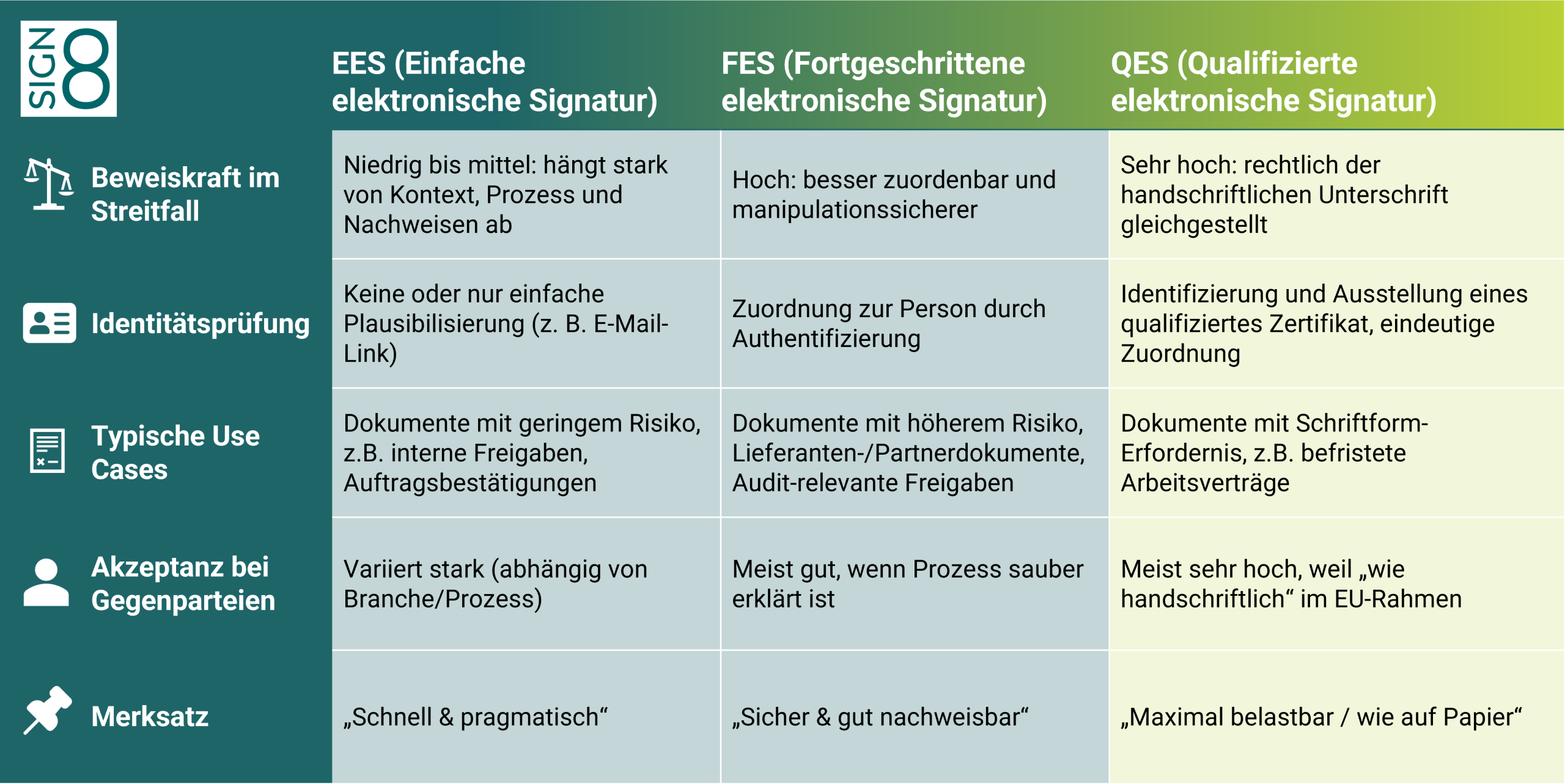
Before you create a digital signature, it’s worth taking a moment to check the facts: there isn’t just ‘one’ type of electronic signature that’s suitable in every situation. The eIDAS Regulation distinguishes between three levels of signature – EES, FES and QES – which differ primarily in terms of legal validity, identity verification and the effort involved. (ec.europa.eu)
The table below will help you quickly work out what you really need: Is it for quick approval in everyday situations? Or does the signature need to stand up in court if necessary? It’s particularly important to note that, within the EU, only the QES is legally equivalent to a handwritten signature.
Creating a digital signature – an overview of your four options

SIGN8 signing portal
Would you like to create digital signatures?
The SIGN8 signing portal works on any device with a web browser, without the need to download any software.

SIGN8 signing APIs
Would you like to integrate signature processes seamlessly into your systems?
Our signing APIs – CSC and Workflow – make it possible: fully automated and seamlessly integrated.

SIGN8 signing token
Would you like to digitally sign PDF documents yourself, locally and offline?
With the signing token, for example, you can sign documents directly in Adobe – without needing an internet connection at all.

SIGN8 TCI
Do you have high signature volumes or stringent security requirements?
The Trust Centre Infrastructure (TCI) enables certificate management within your own server environment.
Save up to 90% of the time when signing documents
The first time you create a qualified digital signature, you’ll need to verify your identity.
You have the following options:
Validation of digital signatures
Would you like to verify the authenticity of a digital signature? If so, you have the following three options:

FAQ on digital signatures
What does ‘legally valid digital signature’ mean?
It meets the requirements applicable to your document. The key factors are formal requirements (statute/contract) and its evidential value in the event of a dispute.
What are the different levels of digital signatures (EES, FES, QES)?
eIDAS distinguishes between three levels: EES, FES and QES. They differ primarily in terms of identity reference, verifiability and the level of effort involved.
Do I always need a QES?
No. A QES is particularly useful when maximum evidential value is required or when a ‘handwritten’ appearance is expected. For many everyday situations, a lower level is sufficient.
Is a scanned signature in a PDF automatically ‘handwritten-style’?
No. A scan may indicate consent, but is not automatically equivalent to a handwritten signature.
Discover our latest blog posts on signature solutions

What is a digital certificate?
Digital processes require trust. When contracts, evidence, notices, or applications are no longer processed on…

Signing documents electronically: a comparison of signature types
Electronic signatures have become an integral part of business processes for many companies. For departments…